Managing Expectations for Clients: Improving Income Questions

At mRelief, we’re constantly evaluating our product and looking for ways to make applying for CalFresh even easier. Most recently – as you may have seen in our November newsletter – we have been working to improve the income section of our online and SMS application.
It’s no secret that income is one of the most crucial factors for CalFresh eligibility. However, income was also where we were seeing the most conflicting information coming in from our applicants.
In this piece, we’ll talk about how this Income Restructuring came about, our areas of focus, and the benefits we’re seeing so far.
What drove this change?

Our design process was guided by 3 factors:
- Outcomes data on cases
- Consulting with in-house expertise
- Robust UX Tools that help analyze user interaction at scale
Our Design Process
When looking at the numbers, we found that a considerable amount of denials were related to income. In fact, of the 19 clients that were denied in one of our California pilot counties in October, 68% of them were denied because their income exceeded the limit. Correspondingly, 38% of those income discrepant cases were submitted with the client’s net income rather than gross.
What’s more, for clients who are paid bi-weekly instead of bi-monthly, their income is multiplied by 2.167 to get to a monthly average. This often sent seemingly likely-eligible applicants over the income limit after the multiplier was calculated by our operations team.
Before trying to solve this problem, we analyzed frequent inconsistencies regarding the income questions themselves.
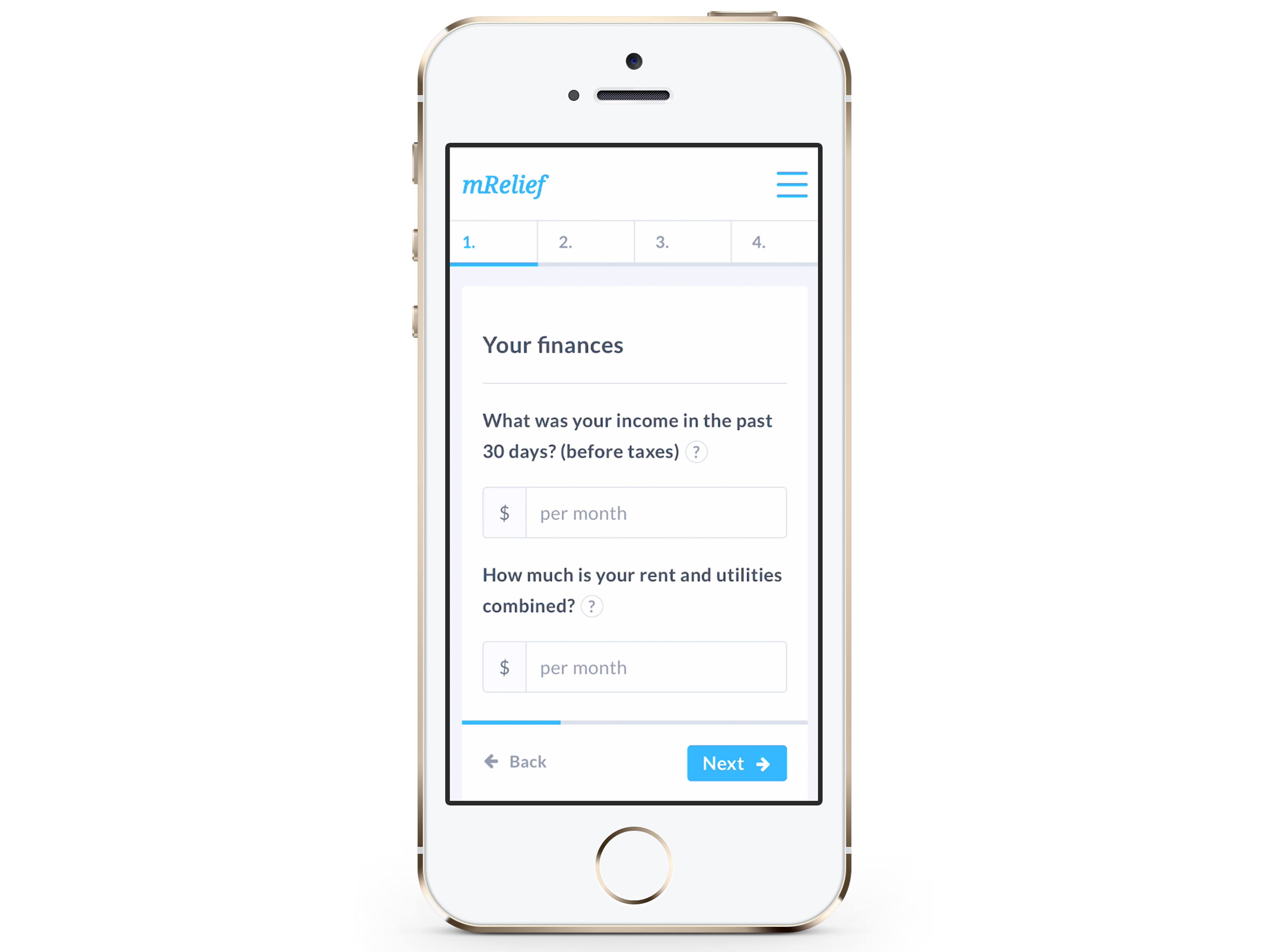
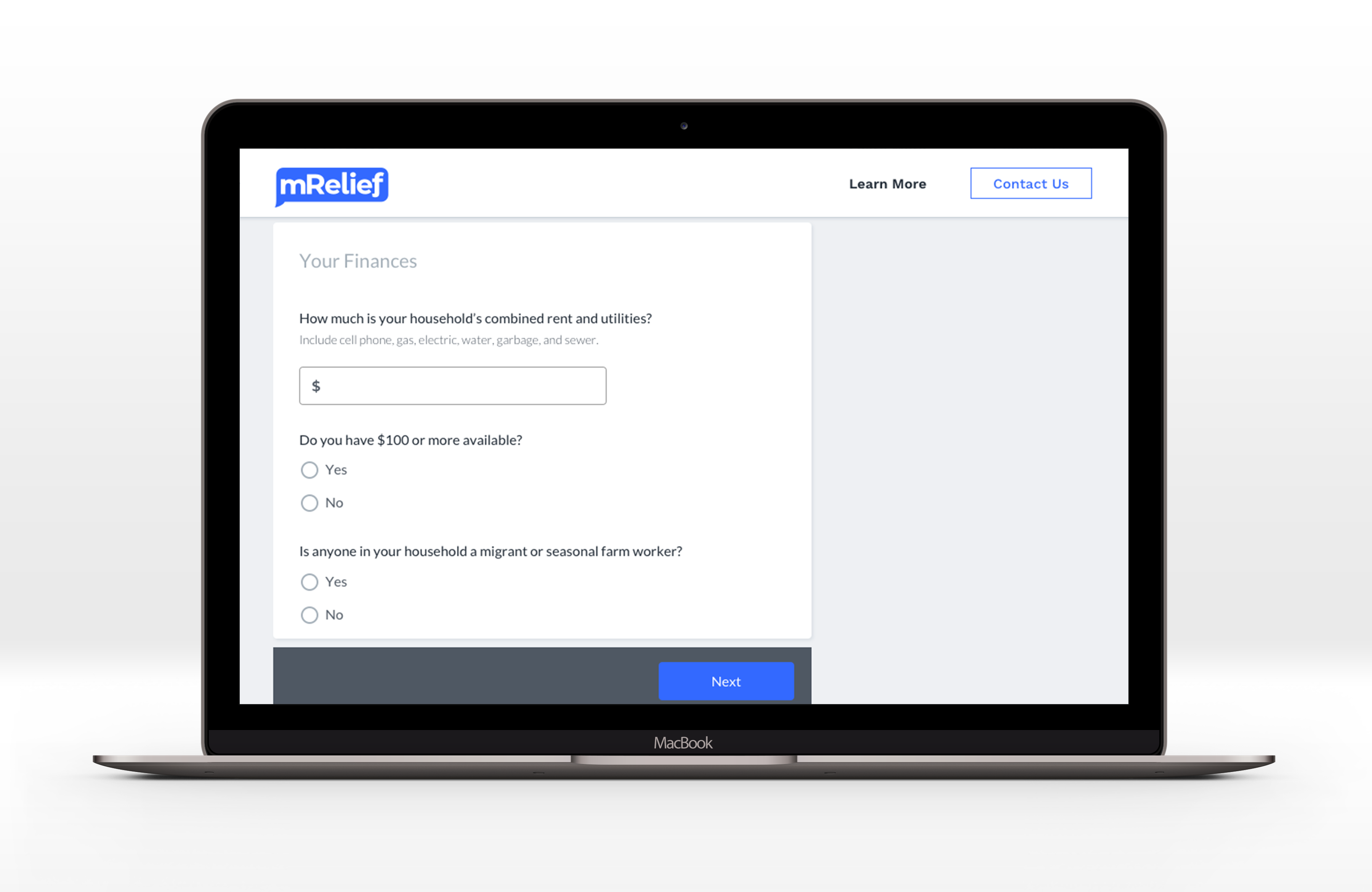
Our original application addressed income very simply by asking, “What was your income in the past 30 days (before taxes)?” This income question was accompanied by other financial questions, such as rent and utility amount, on the same page.
Kate Murray is our Operation Associate at mRelief and her role is to assist clients who do not get a disposition on their case on the first pass through the automated flow in our pilot counties in California. mRelief provides a detailed data dashboard on the client journey for screening to denials, and Kate keeps a detailed log of why applicants are denied. This was a key source of information during the design process.
The next part of our process was watching FullStory videos. FullStory is a tool that provides DVR recordings of each user interaction on your site. For this analysis, we were able to review all 19 clients in real time.
After conducting this thorough analysis, we realized that applicants were struggling to accurately respond to income questions for a handful of reasons:
- The way we asked and explained income questions lead clients to inaccurately guess their own income.
- The design of our “Your Finances” page encouraged applicants to quickly fill out their income and hurry to the next question.
- Applicants were unsure about their income before taxes and the difference between gross and net income. Applicants who were over the income limit were unaware that they were likely ineligible.
Reducing Cognitive Load
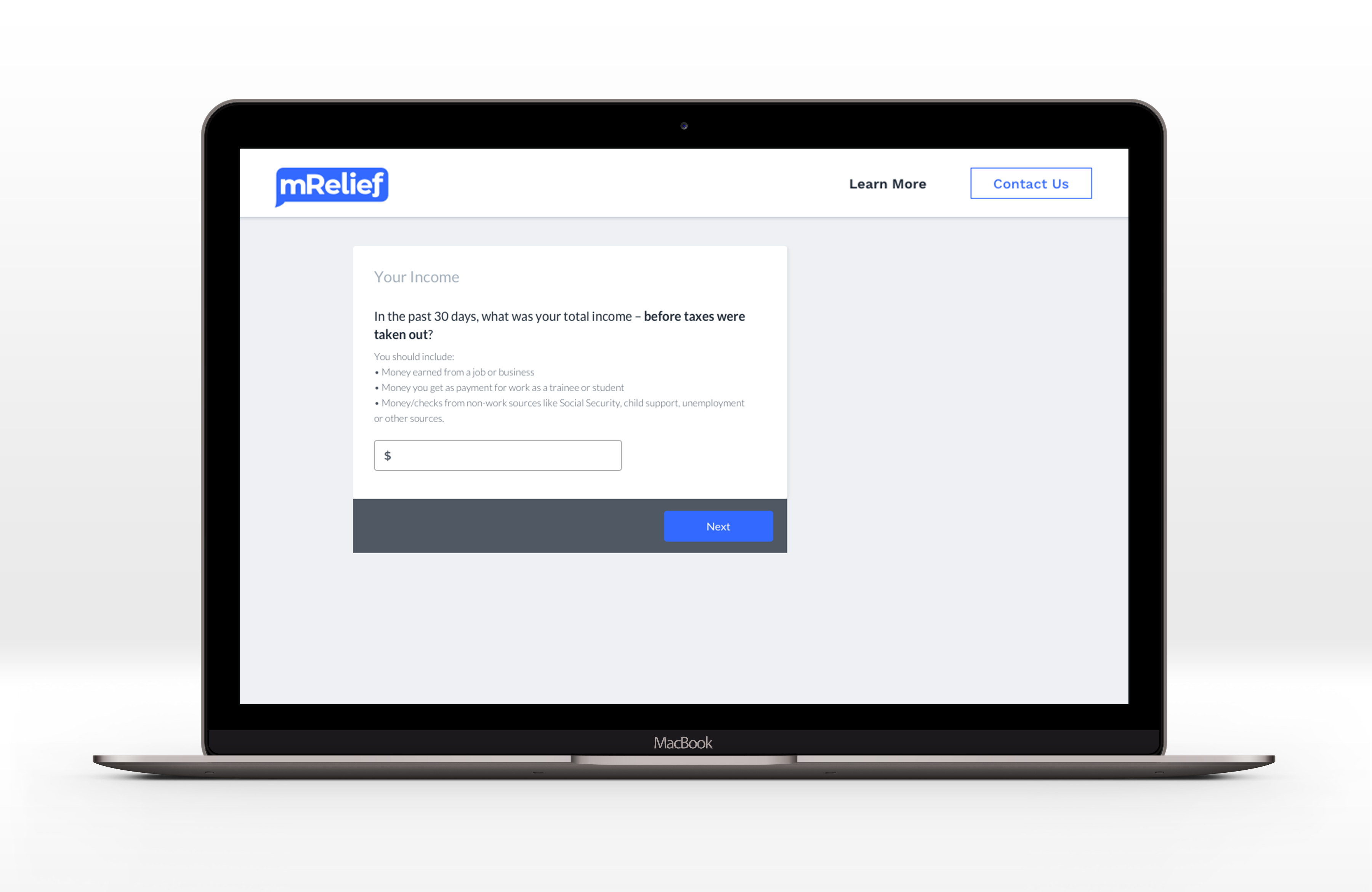
To improve the way we ask the income question on the application, we concentrated on copywriting, design best practices, and cognitive load. It’s well known that a typical web user doesn’t read full pages of content, but scan the page for key information.
Are you still with us? ;)
When taking this into consideration for our flow, it was important to highlight key information for clients when getting to the income page. For instance, including commonly forgotten sources of income – such as a spouse’s income. Additionally, it’s important to be aware of the cognitive load that a web page could have on a user. Breaking “Your Income” into its own separate page from the ”Your Finances” section helped to keep the focus on income alone.
Exceeding the Income Limit
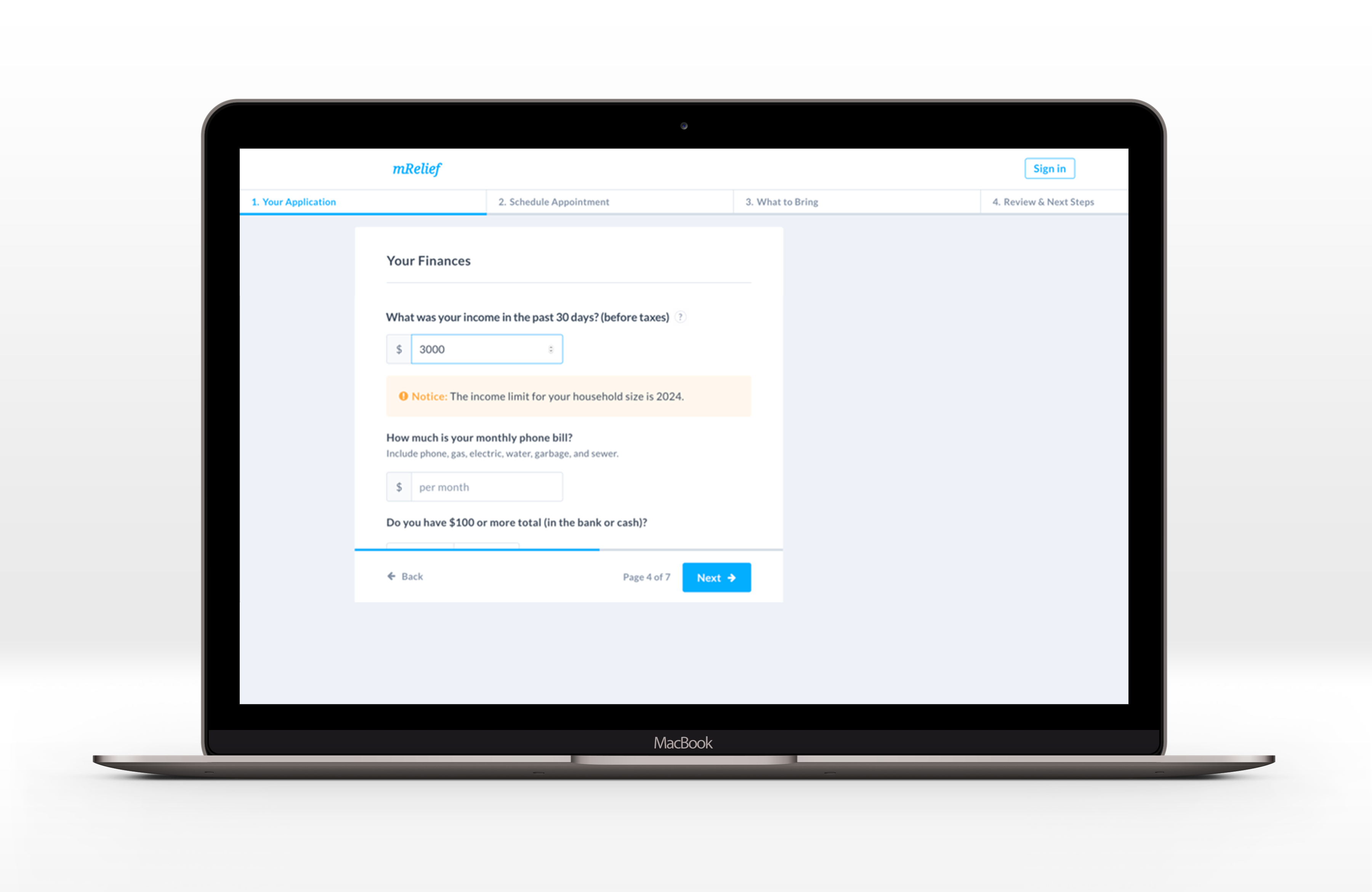
After watching FullStory sessions of real applicants, I observed a flaw in the income section of the old application: In-line erroring. An in-line error is a best practice that is typically used when you skip or incorrectly fill a field on an online form. Once the system recognizes the error, that section of the form turns red or pops up with a warning next to it stating something important.
Because a client’s income is the primary factor determining their eligibility, an in-line warning was not enough in this instance. Additionally, the income question was the first of many questions on the page. An applicant could easily miss the warning, especially when they’re trying to advance through the flow quickly. Resulting in them clicking the “next” button to continue without realizing they were over the limit for their household size.
When taking all of this into consideration, there were a few critical User Experience objectives:
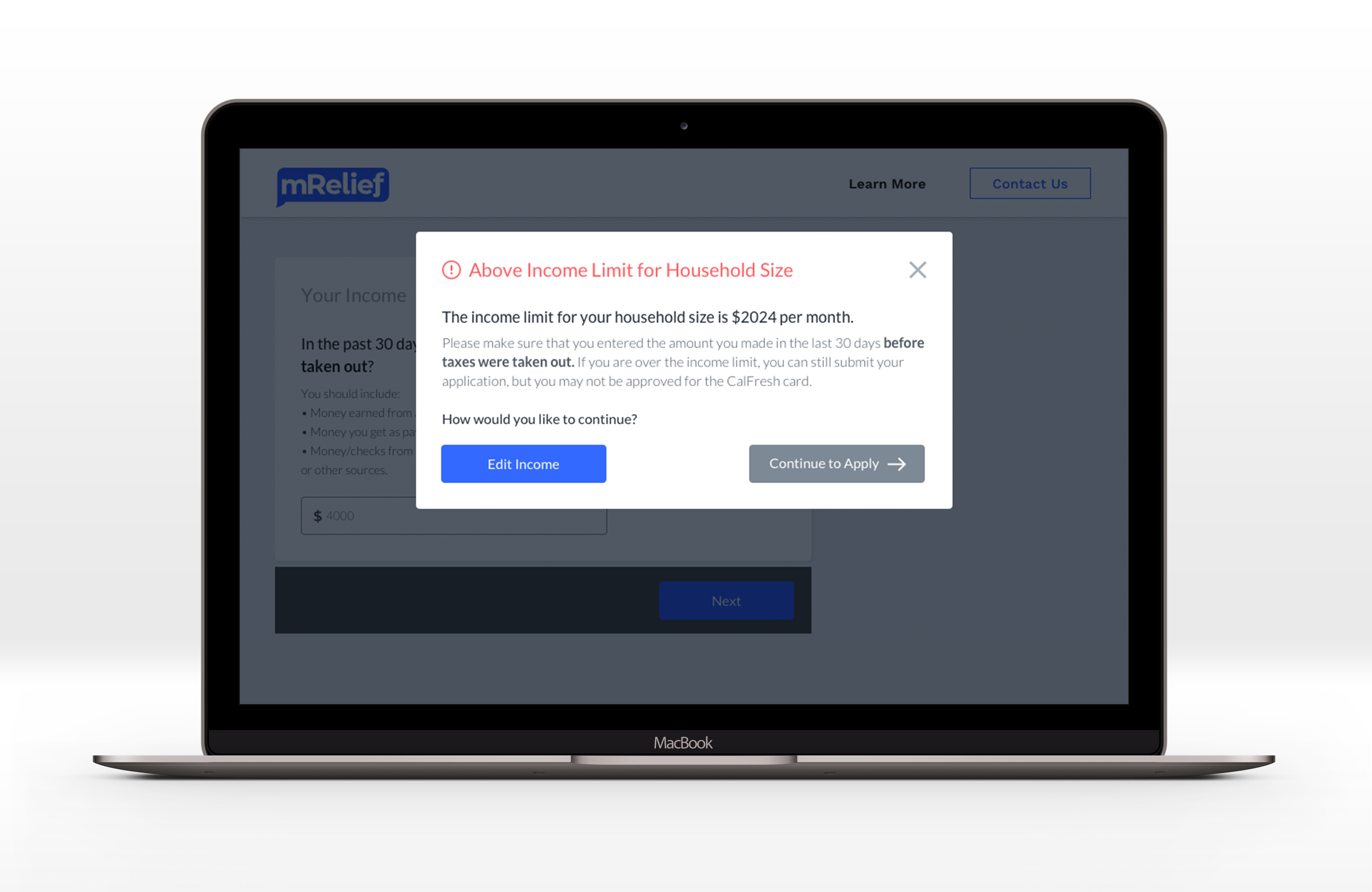
- Alert applicants who entered an income over the limit, that they may not be eligible.
- Allow applicants to adjust the income amount they entered (in case of error).
- Inform and allow applicants to continue through the process of applying if they are likely-ineligible.
When taking these goals into account, it was a priority to design an easy to use and intuitive solution that would get the job done. A modal, also known as a dialog box or overlay, is a window that pops up on your screen. It’s important to note that modals should only be used when you require a user’s attention and an action needs to be performed on their end. Since all of these cases were true, a modal was the right decision here. This solution allowed applicants to achieve all possible endpoints, without distracting from the larger goal at hand – finishing their CalFresh application.
Close to the Limit
A major bucket that applicants were falling into on the older version of our application was entering an incorrect income amount that was very close to (but under) the income limit. These clients would then interview with the CalFresh office, only to be denied. To combat this use case, we utilized our jump logic system within the income user flow.
What’s a jump logic system?
Jump logic is a feature that adjusts what question or page you will see next, based on how you answer a question. We use jump logic in many areas throughout mRelief’s screener and application to ensure that clients are only answering questions that are required for their specific needs.
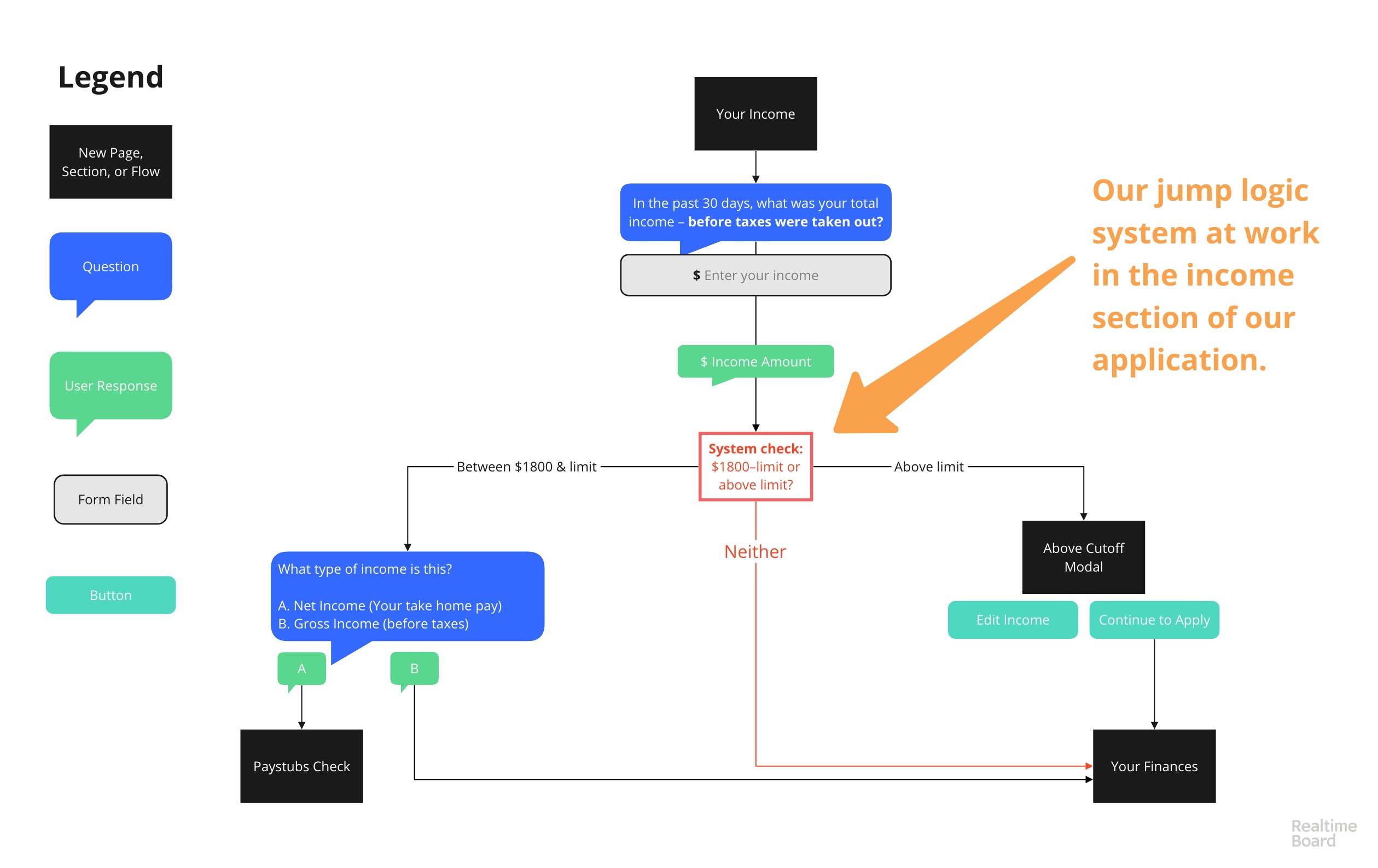
For the income flow, we set a range of $1800–$2024. $2024 is the income limit in California for a single person household. When a user enters an income amount within this income range, they are prompted to answer a new question to confirm the type of income.
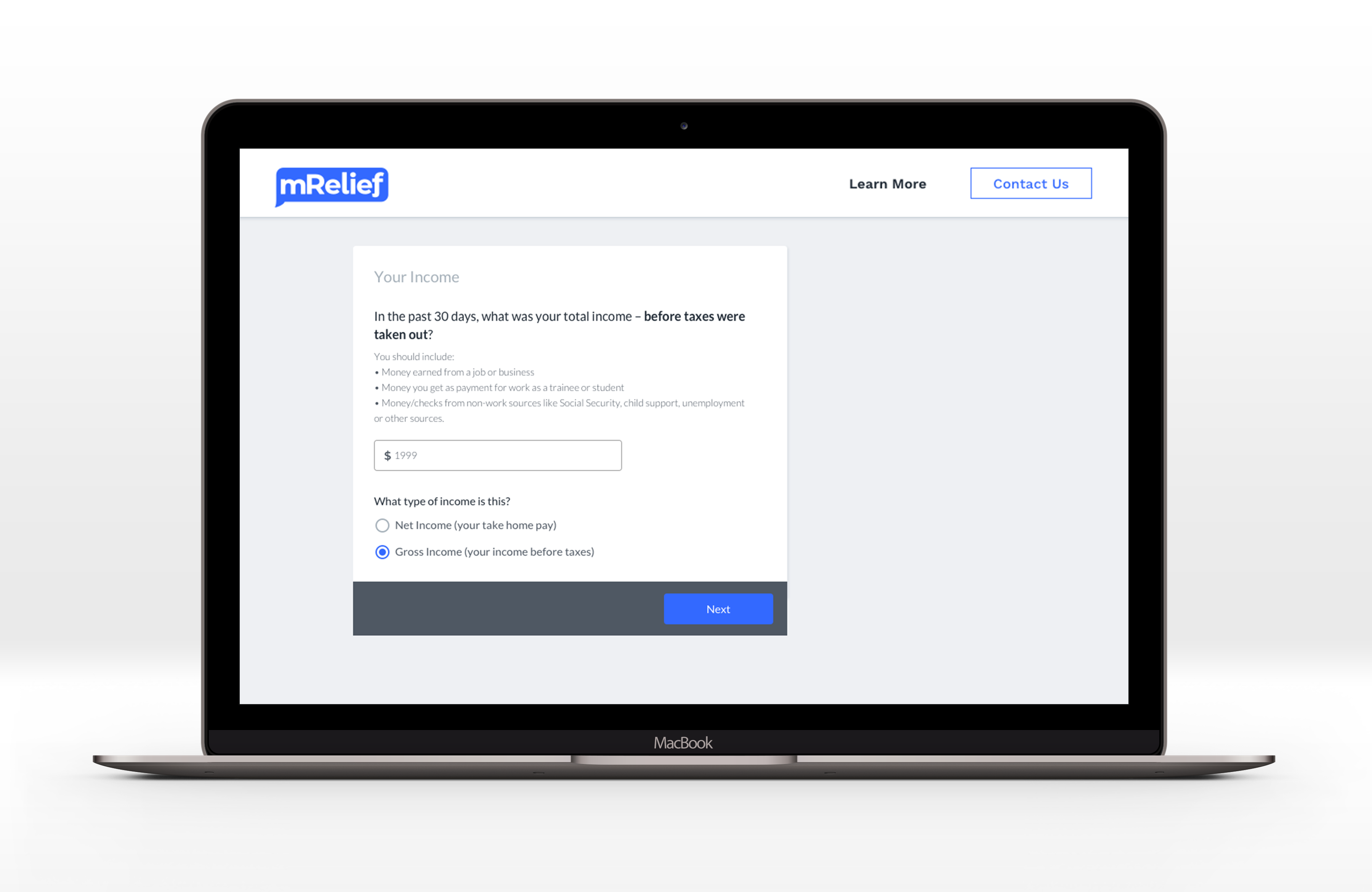
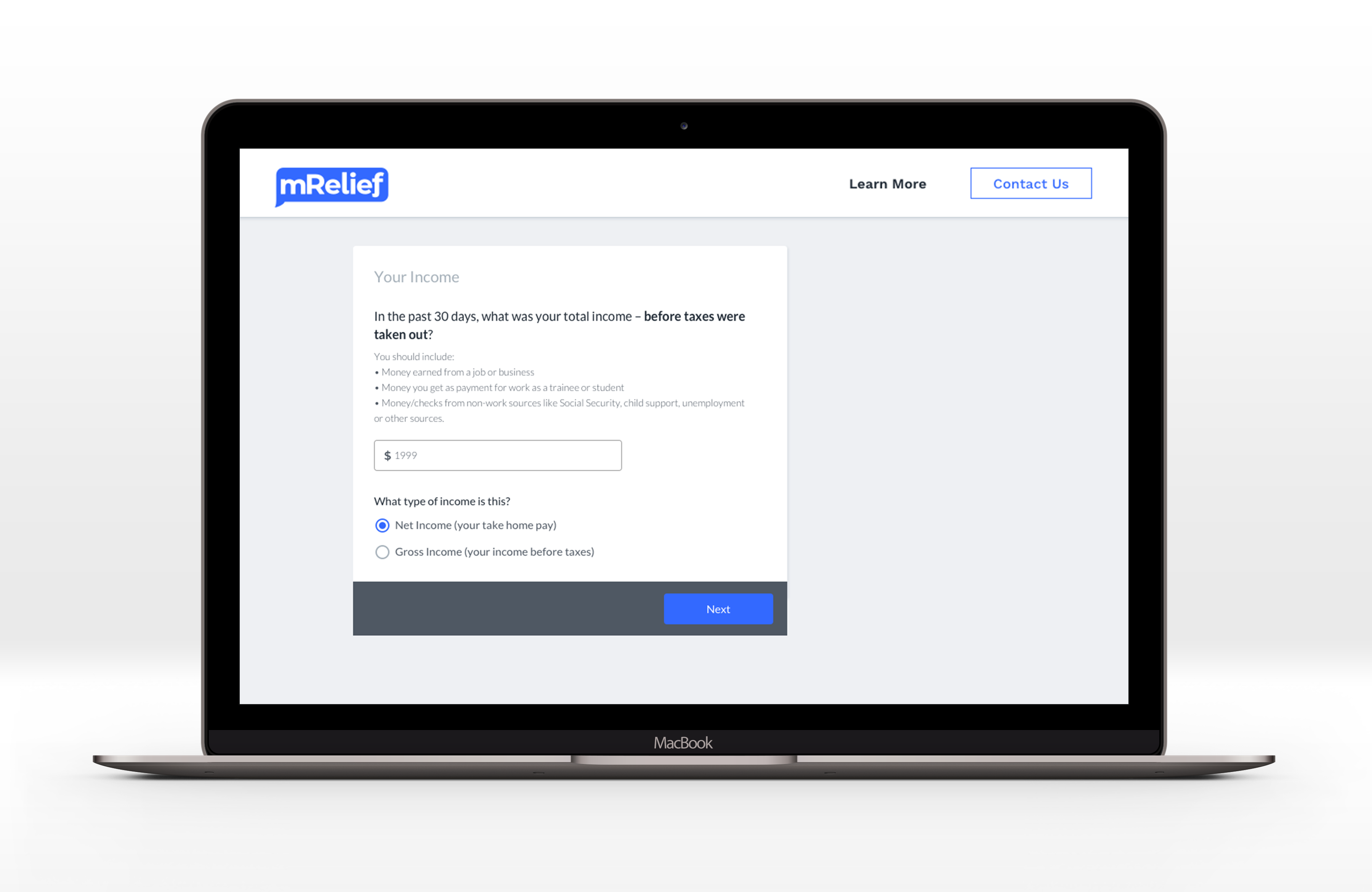
Even though we originally ask for income before taxes, we were seeing many clients enter their take-home pay amount. So, when a client finds themselves in a situation where they may or may not be eligible due to income, we ask them to double-check whether that income is gross or net. When a client selects “gross income”, they are guided to the next section of the application.
When a client selects “net income”, the door opens for us to step in and offer support. It can be difficult to calculate the amount of taxes that could be taken out of a client’s pay. So, we make the option available for them to have us review all pay stubs from the last 30 days. This way, we’re in high touch with the client and we can be absolutely sure about their income status before submitting their application to the office.
Right to Apply
One challenge we share with our government stakeholders is designing tools that account for change management, the ever-dynamic circumstance of a client who screens. Our approach to change management means screening doesn't end with the brief income questions in the initial pre-screener. That logic follows applicants through the application and prompts clients when they share information that suggests they may exceed the SNAP gross income limit.
However, in the FNS guide on best practices for SNAP applications (Page 47) section 8.3 discusses the "right to apply." This states a client has a "right to apply regardless of whether the online tool indicates they are likely to be eligible for the program."
Thus at mRelief, we must balance change management with FNS compliance. Though our original income flow was in compliance with FNS and allowed clients to submit an application even if they were likely-ineligible, the client was unaware that they were likely-ineligible.
We offer three ways for the client to send us their pay stubs:
- An online uploader
- Via text message photo
- Phone call
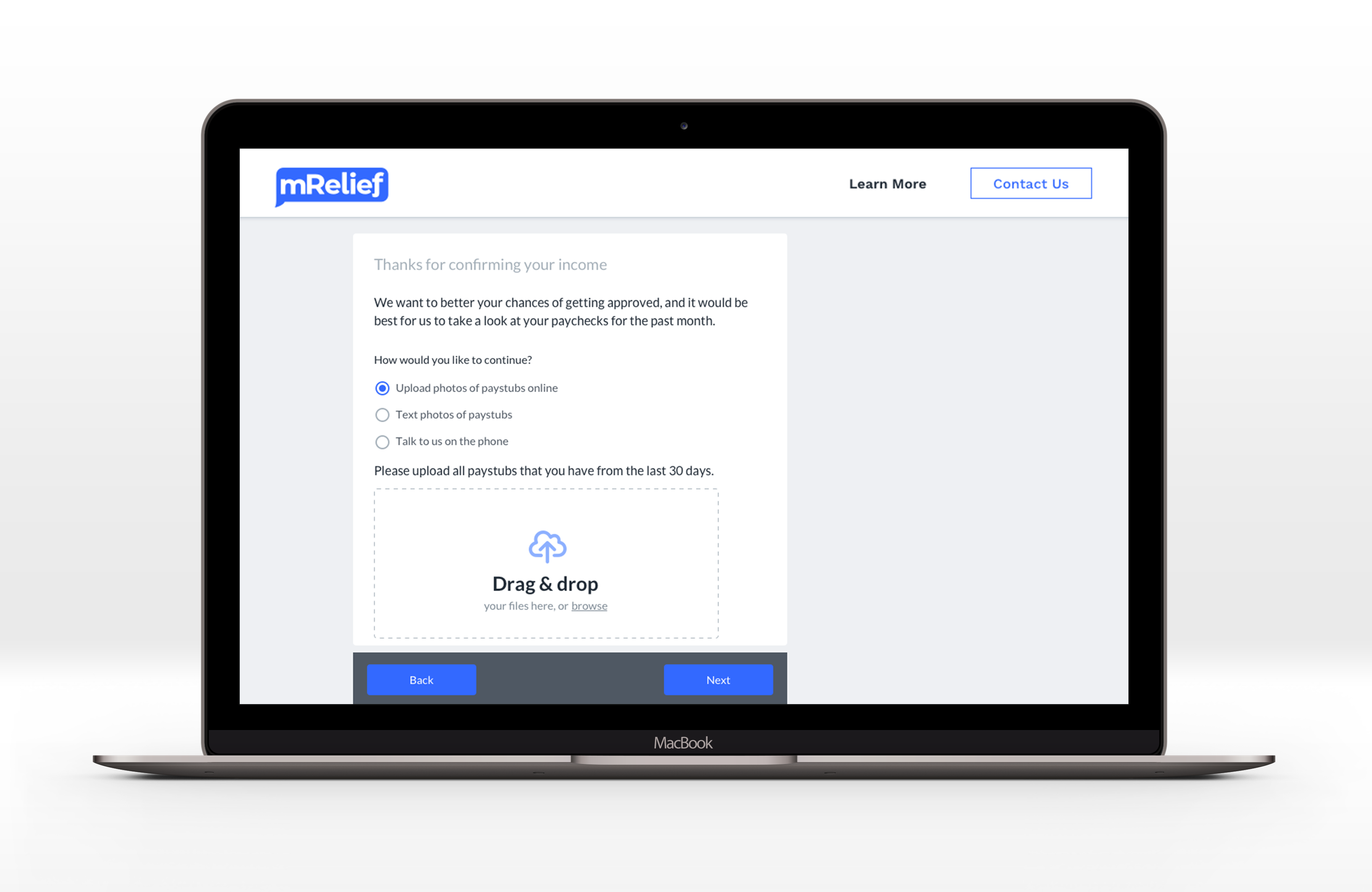
Once we have the documents, our operations team reviews within 24 hours and gives clients information about the income limit. A majority of clients in this month were approved for SNAP via an eligibility worker. Further 97% of clients chose to file an application immediately in the month of November, we did have a few cases where 2 clients made well above and decided not proceed and this saved them an estimated 136 minutes of their time since implementation on November 5th.
Continuous Improvement
All in all, this income experiment is just that – an iterative test to see how clients identify, understand, and misunderstand their own income. We have also been really intentional about the scope of this experiment. Because SNAP income eligibility is different for those who are self-employed and for households greater than 1, this feature is currently only available for clients in single households.
We’re looking forward to continuing the conversation on income questioning as we get more data in about successes and improvement opportunities.
Creating transparency for clients around the application requirements has always been our goal at mRelief. By 2020 we’re looking to enroll 1 million families in SNAP and maintain high standards of ethical automation and accessibility as we get there.